Free Flyer Friday #51 – Suicide Saturdays Flyer Template

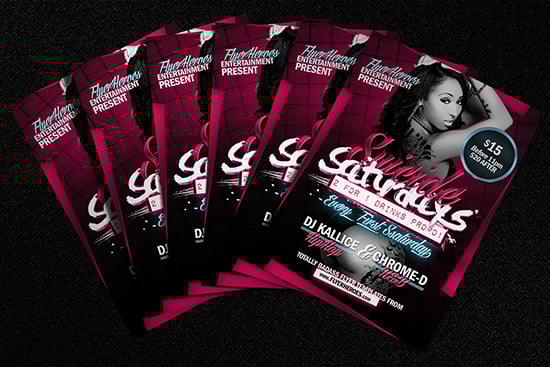
Suicide Saturdays Flyer Template

  • Sharebar

WOWZA! How freaking cool is this for a free flyer template!? Introducing Suicide Saturdays, a badass, bright, vibrant and super sexy free bar / club flyer template – with an ATTITUDE!

I posted a preview of this freebie on our Facebook page a few weeks ago and you guys went absolutely nuts for it!

So, no more waiting folks, it’s finally here – scroll down the page and click download to get your hands on a copy at last!

What fonts do I need to use this free flyer template?

Suicide Saturdays is a flyer template I created.. let’s say.. ‘as practice’. As a designer, I’m an advocate of constantly learning new things, new ways to use your tools and new styles and methods of working whether from tutorials, tutors or simply by studying someone else’s work – regardless of how talented you already are.

…And this is the result of exactly that – me trying to improve my work by utilising different styles and being influenced by my peers.

Do you think I’ve done alright? Would you say this is different from my usual work? Do you like it?

Let me know in the comments!

We already plenty of clean and crisp flyers, so I think it maybe time to release a few more like this, you know, flyers with that dirty, grungy and in-your-face sort of pop about them.

Suicide Saturdays definitely gets us off to a good start with that I think!

Suicide Saturdays Flyer Template

Suicide Saturdays Flyer Template

Suicide Saturdays Flyer Template Mockup

Suicide Saturdays Flyer Template Mockup 2

Suicide Saturdays Flyer Template Mockup 4

By downloading this free flyer template, you accept and agree to our Terms of Use.

http://flyerheroes.com/wp-content/plugins/downloads-manager/img/icons/default.gif download: Suicide Saturdays Flyer Template
added: 07/02/2013
clicks: 22913
description: A bright, vibrant and totally badass flyer template. Suicide Saturdays is a free club flyer template that comes packed with attitude.


fold-left fold-right
About the author
My name is Adam McIntyre and I'm the Editor here at Flyer Heroes! I'm a passionate Graphic Designer and I love designing flyers! You can get my premium flyers here!
Club Flyer Bundle by FlyerHeroes

25 Replies to Free Flyer Friday #51 – Suicide Saturdays Flyer Template

  1. BKV says:

    Such a beautiful, very nice work, professional

  2. TuxZito says:

    Nice and Clean, Love It!!!

  3. nowaypedro says:

    Bloody awesome mate!

  4. adebabyo1 says:

    Hi There,
    Nice Work,

    i was wondering where did you get the mock up template 2 image from or is it your own work?

  5. stephps8 says:

    Thanks for this awesome flyer! I already have it set up to use. One question, is there a way to change the background color (from the pink to something more manly?) I am not sure with the smart objects. Thanks again!

    • Adam says:

      The easiest way would probably be to insert an adjustment layer (Hue/Saturation) above the Background folder and change the sliders until the background turns blue :)

  6. AlexMontiel says:

    Simplemente Eres El Mejor

  7. RaulRoberto says:

    Amazing man, thanks!

  8. DJ SKY says:

    Man you the best designer i hv ever heard…this is good work ..but how to replace these image thumb with my picture..thanx

    • Adam says:

      Aww you’re making me blush! :P
      Glad you like the work!
      You’ll see a thumbnail called ‘clip to me’
      paste your image directly above this layer, right click on your image’s layer and select ‘Create Clipping Mask’

  9. moonisis says:

    Thank you for your free club flyer downloads…. BUT….

    Re: Free Flyer Friday #51 – Suicide Saturdays Flyer Template
    By Adam | February 15, 2013

    Well, I’m trying to use your flyer but personalize for my use….so, I’m a novice, and just download
    Adobe Photoshop using Creative Cloud (for 29.99/mo. cancel anytime…from adobe.com). When I open your suicide flyer template I get a message – “Adobe Photoshop CS6 – Some text layers contain fonts that are missing. These layers will need to have the missing fonts replaced before they can be used for vector based output.” So,
    I installed the two new font types as you suggested, but the flyers are still not visible in Ps. What do you suggest I do?

    Thanks,
    moonisis

    • Adam says:

      Hey Moonsis, glad to hear you’re using Adobe Creative Cloud!

      Ok, when you have the fonts installed, open the flyer in Photoshop. It’ll appear blank because the layers are turned off (this makes the file size smaller for downloading)

      Simply look in the layers panel on the right hand side and click on all the greyed-out ‘eye’ icons. This will turn the layer visibility back on :)

  10. StarPro18 says:

    I Love THis Its so Wow mein….Got Skills

Trackbacks for this post

  1. Synergetic Free Club Flyer Template | FlyerHeroes

Leave a Reply